How to Activate Your License
If you've purchased a premium license for Slashit, activating it unlocks all advanced features using unlimited AI Token like Create and Use unlimited Magical AI-powered templates, slash commands, and productivity stats. Whether you're a new user or upgrading from the free version, follow these steps to activate your license and start getting the most out of Slashit.
Looking for your license key?
- Check out our guide: How to find your license key
For New Users: Activating After Sign-Up
-
Start from the Get Started page
Sign up with your email and complete the initial onboarding flow. -
Login Confirmation
Once your account is confirmed, you’ll see a message confirming you're logged in. -
Access the ‘Activate Premium Feature’ screen
You'll be prompted with three options:
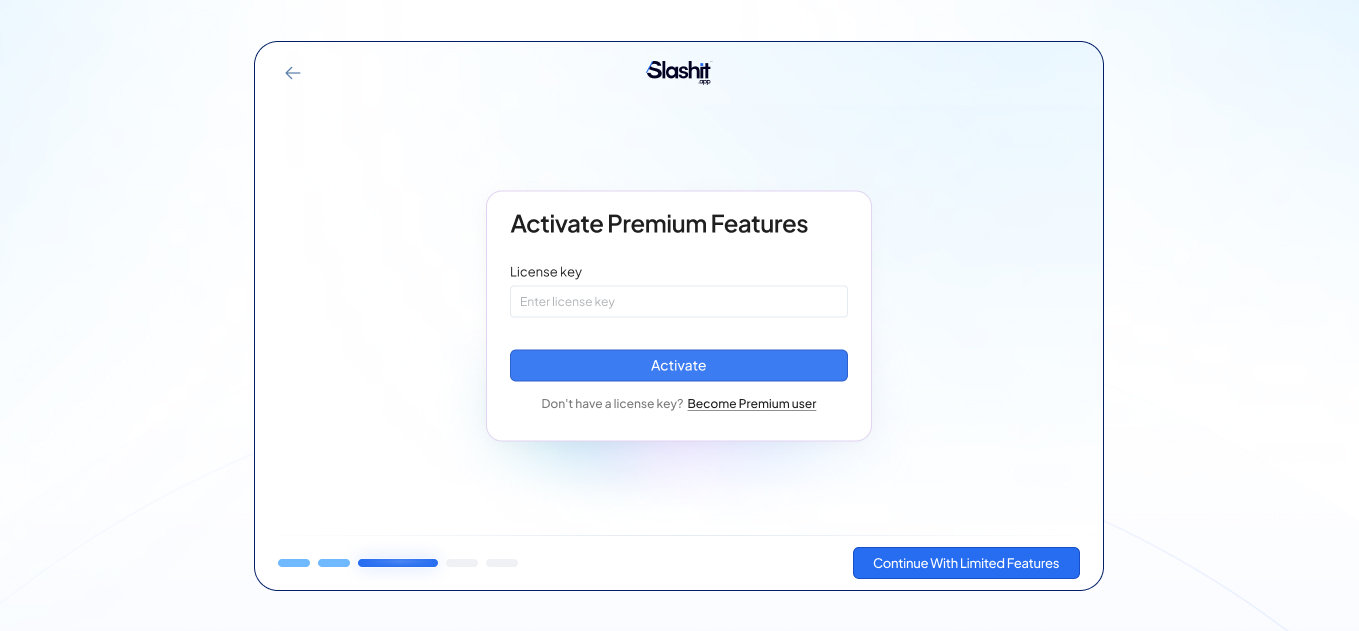
-
✅ Enter License Key – Paste your license key and click Activate
-
💳 Buy a Premium Package – Redirects you to our pricing plans
-
🔄 Continue with Limited Features – Use Slashit free version
-
Grant Permissions
After license activation, approve required system permissions to ensure Slashit runs smoothly on your device. -
Start Using Slashit
You’ll land on the welcome screen, and Slashit is now ready with premium features enabled.
For Existing Free Users: Upgrading to Premium
-
Open the Slashit App
-
Go to Settings > Subscription & Billing
-
In the Activate Premium Feature section:
-
Paste your License Key and hit Activate
-
Or choose Buy a Premium Package if you haven’t purchased yet
-
You can also continue using the limited features
-
-
Once activated, your Subscription Plan & Billing Details will be displayed
-
You’ll also see a Manage Subscription button
Clicking this will take you to LemonSqueezy’s → billing portal — where you can manage or cancel your subscription at any time.
Troubleshooting Tips
-
Make sure your license key is copied exactly as provided (no extra spaces)
-
Ensure your internet connection is active during activation
-
If activation fails, restart the Slashit app and try again
-
Still stuck? Contact us at support@slashit.app
🎉 You’re All Set!
Once activated, Slashit will automatically unlock premium slash commands, dynamic templates, snippets, and access to your stats dashboard. Welcome to faster, smarter writing.